
Drop an image.
Get the format you need.
A tiny menu bar app for your Mac that converts PNG, JPEG, WebP, HEIC and more — with one drop, and a compression preset that fits where the image is going.
Free · macOS 12 or later · Apple silicon & Intel · All releases
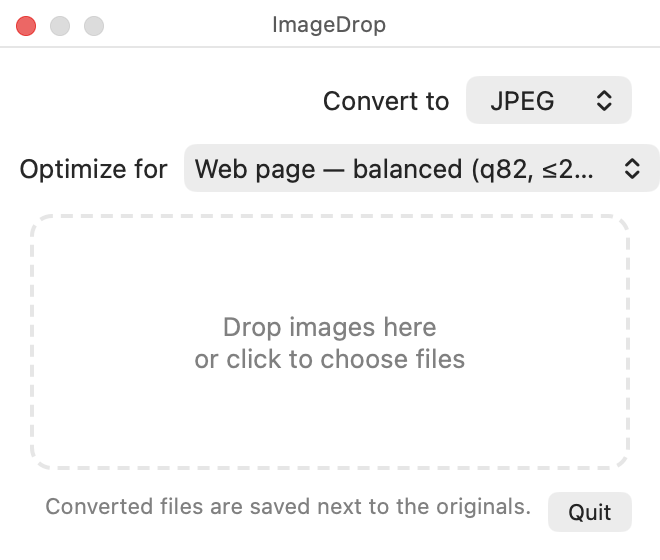
Small app, no fuss
It lives in your menu bar and stays out of the way until you need it.
Any format to any format
Drop a HEIC from your iPhone and get a JPEG. Turn a PNG into a WebP for the web. The converted copy is saved right next to the original.
Presets, not sliders
Pick where the image is going — web page, social media, email, thumbnail — and ImageDrop chooses sensible quality and size limits for you.
Private by design
Everything happens on your Mac using Apple's built-in image engine. Nothing is uploaded, no account, no tracking.
Batch friendly
Drop a whole selection of files at once, or use “Open With” from Finder. Photos are auto-rotated the right way up.
Install in a minute
ImageDrop is a free, independently made app, so macOS asks you to confirm the first launch.
- Download the zip above, unzip it, and drag ImageDrop into your Applications folder.
- Open it once. macOS will say it can't verify the developer. That's expected — the app isn't notarized with Apple (which costs a yearly developer fee).
- Allow it. Open System Settings → Privacy & Security, scroll down, and click Open Anyway. Or, from Terminal:
xattr -dr com.apple.quarantine /Applications/ImageDrop.app - Look up. A photo icon appears in your menu bar. Click it to open the drop panel.
WebP export uses the free cwebp tool from Homebrew (brew install webp). Every other format works out of the box.
Buy me a coffee ☕
ImageDrop is free and always will be. If it saves you time, a small tip helps keep it maintained. The panel on the right takes Apple Pay or any card — no account needed, and your tip goes straight through.
Prefer a separate page? Open the tip jar on Ko-fi.